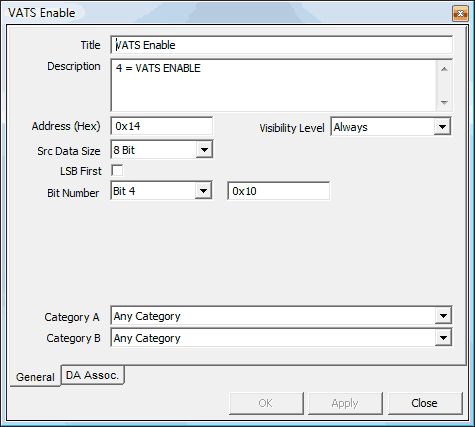
Flags (sometimes simply called "bits") represent a single bit within a byte in the bin. Flags are often used as "switches" for functionality within the car's ECM program. For instance in the screenshot above, a single bit enables or disables VATS (Vehicle Anti-Theft System). If this bit is unchecked in the flag editor, VATS will not function, allowing the car to start without the embedded "chip" in the key.
Title - This is the title of
the bit/flag. This title will be visible in the main and summary item lists.
Description - This field is used to describe the functionality
of the flag for the end-user. The information entered in this field will be
visible in the item comments box in the main application window.
Address - This field represents the address, in hex, within
the bin of the raw byte containing the bit to be edited. This address may
be offset by the amount specified in the Base Offset
field of the XDF Header editor.
Bit Number - This is the bit number of the byte of the flag.
This number is zero-based, meaning the first bit is bit 0, and the last bit
is bit 7.
See Also: