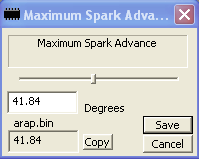
The Constant Editor
XDF Constants |
Constant Overview |
A constant (sometimes referred to as a "scalar") is a singular value in a binary. A constant might be used used, for example, to represent the temperature above which a cooling fan engages, or the maximum RPM of a motor.
The Constant Editor |
The Constant Editor
To edit a constant, select the constant you wish to edit from the constants list. The desired parameter and its current value are displayed in the constant editor. You can select the number in the edit field and type in the value you desire. If you do this, when the item is saved (either by pressing the save button in the editor or by saving the bin out to file), the value you chose will automatically get rounded to the nearest possible value in the bin.
Another choice is to hit the keypad + and - keys or Ctrl + "+" or Ctrl + "-" on the main keyboard to increment and decrement the values to their nearest possible values.
If you have a comparison bin selected, the compare bin's value will also be displayed. You may copy it manually or by pressing the "copy" button.
You may use the slider provided in the editor window to select a value within the possible range of values for the item. Updating the value in the edit box will update the position of the slider in realtime.
See Also: Flags, Tables, Editing Bins, Comparing Bins
TunerPro Help V1.2 Compiled 7/17/09 23:09